AZDesign: Design Azure Labs Visually and Export Bicep
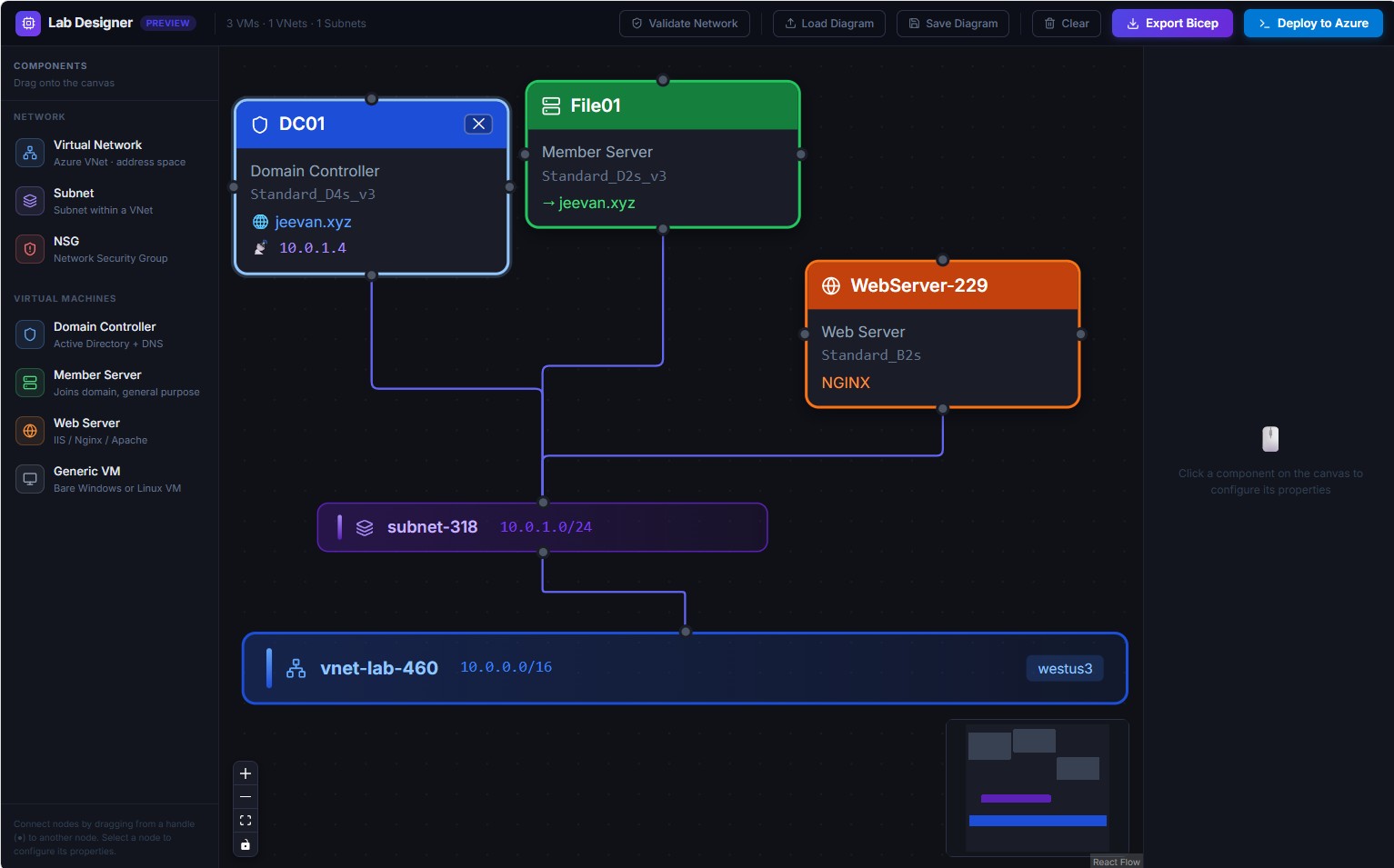
Building an Azure lab usually means hand-writing scripts / ARM templates / Bicep, second-guessing CIDR ranges, and hoping your member servers don’t try to join the domain before the DC is ready. AZDesign is a small project I built to make that whole flow visual.
Why I built it
I spend a lot of time building labs — sometimes to reproduce a customer scenario, sometimes just to stand up a fresh environment and try something new. Most of them map closely to enterprise customer setups, and I often need to spin up several environments quickly.
I do use scripts, but constantly adjusting parameters is boring and slow. What I really wanted was an easy, repeatable process: plug in the parameters I need, and maybe even hand the deployment off to an agent. So I built this tool. It meets 100% of what I need — and I’m confident it’ll save time for anyone working in a similar space.
What it does
AZDesign lets you compose Azure infrastructure on a drag-and-drop canvas, configure each resource through a properties panel, validate the network, and export production-ready Bicep — all in the browser. There’s no server, no database, and no login. Diagrams save to portable JSON.
See it in action
Here’s a quick walkthrough:
Features
- Visual canvas — drag-and-drop Azure components powered by React Flow.
- Azure resources — Virtual Networks, Subnets, NSGs, and four VM roles (Domain Controller, Member Server, Web Server, Generic VM).
- Smart IP management — subnet-aware address suggestions, duplicate detection, and a DHCP vs. Static toggle.
- Two-pass validation — network topology checks plus deployment readiness (VM naming rules, forbidden usernames, DC config).
- Bicep export — parameterised
.bicepfiles with@securedecorators and the correct AD DS dependency chain. - Deploy wizard — generates the Azure CLI commands for a one-click deployment.
Why the dependency chain matters
The detail I’m most proud of is the AD DS join sequence. A naive template lets a member server’s NIC provision before the domain controller is actually serving Active Directory, which causes the domain join to fail intermittently. AZDesign wires up DSC → WaitForAD → (NIC + DomainJoin) so the member server waits until ADWS is running:
// Member NIC waits for AD to be ready before provisioning
resource nic_MemberServer01 '...' = {
  dependsOn: [ext_DC01_WaitForAD]   // not nic_DC01
}
Try it
You can use it right now at az-design-nine.vercel.app, or run it locally:
git clone https://github.com/jeevanbisht/AZDesign.git
cd AZDesign
npm install
npm run dev
Then open http://localhost:5173, drag a few components onto the canvas, validate, and hit Export Bicep.
Takeaway
AZDesign turns Azure lab design into something you can sketch in a couple of minutes and deploy with confidence. Give it a try, and if you have ideas, the repo is open for contributions.
← Back to all posts