# Deploy Global Secure Access in Coexistence with other SASE/VPN Products

> Free interactive guides for deploying Microsoft Global Secure Access alongside Zscaler, Cisco, Palo Alto, and Netskope with animated traffic flow diagrams and tenant-aware config.

- Author: Jeevan Bisht
- Published: 2026-06-16
- Tags: global-secure-access, gsa, security, zero-trust, coexistence, zscaler, cisco, palo-alto, netskope, sase, sse, vpn, entrasuite, entra

---
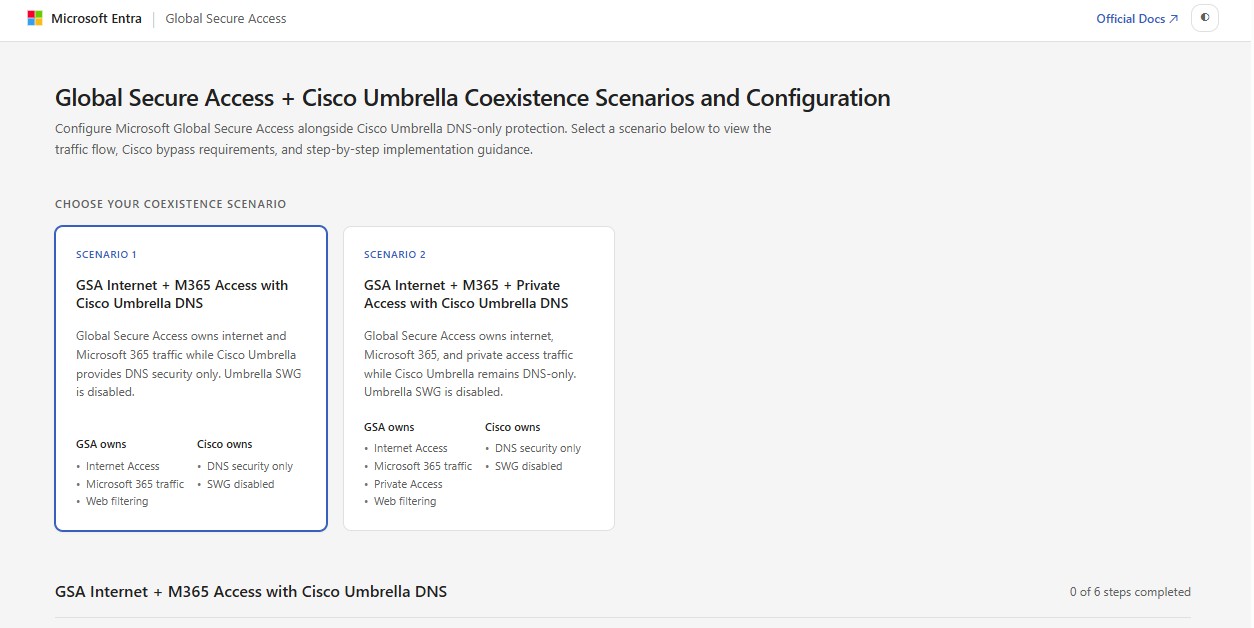
**GSA Side-by-Side Assistant** is a set of free, open-source interactive guides for deploying [Microsoft Global Secure Access](https://learn.microsoft.com/en-us/entra/global-secure-access/) (GSA) alongside third-party security vendors — Zscaler, Cisco Umbrella, Cisco Secure Access, Cisco VPN, Palo Alto Prisma Access, and Netskope. Each guide walks through real coexistence scenarios with animated traffic flow diagrams, expandable step-by-step instructions, and copy-to-clipboard configuration blocks that auto-populate with your tenant ID. If you're planning a GSA deployment into an environment that already runs another SSE/SASE/VPN product, these guides compress what is typically a multi-day, error-prone process into a structured, visual deployment plan.

**[Open the guides →](https://jeevanbisht.github.io/GSASidebySide/)**

## The problem: coexistence documentation doesn't match coexistence complexity

The [official Microsoft coexistence documentation](https://learn.microsoft.com/en-us/entra/global-secure-access/) is accurate and well-maintained — but it's long-form prose, and prose is the wrong format for a multi-step, multi-console configuration task. Following a 4,000-word deployment doc during a change window means reading top to bottom, mentally mapping which paragraph applies to your scenario, copy-pasting config values while hoping you didn't miss a substitution, and trying to envision a traffic flow from a text description.

That workflow has a high error rate. Missed steps, stale clipboard contents, wrong scenario — these aren't edge cases, they're common outcomes when the deployment guide is a long document and the person following it is also managing a change window across two admin consoles.

Three questions dominate every coexistence deployment, and none of them are answered efficiently by scrolling through prose:

- **Which scenario matches my deployment?** — Most vendors support multiple coexistence patterns (split-tunnel, PAC-based, proxy chaining, selective routing). Choosing the wrong one means re-doing the work.
- **What does the traffic flow actually look like?** — Understanding which traffic goes through GSA, which goes through the vendor, and which goes direct is critical for firewall rules, conditional access policies, and troubleshooting.
- **What are the exact config values for my tenant?** — Bypass FQDNs, tenant-specific endpoints, and service IPs vary. Copy-pasting from a generic doc and forgetting to substitute your tenant GUID is a common failure mode.

## Why I built it

The best customer and partner experience shouldn't require razor-sharp attention and a scroll finger. When the deployment guide is a long document and the person following it is also managing a change window across the Microsoft Entra admin center and a vendor console, missed steps and wrong scenarios become the default outcome rather than the exception.

I wanted something that respected the operator's time: pick your coexistence scenario, see the traffic flow animated in front of you, get config blocks pre-populated with your tenant ID, and track completion as you go. The goal was to compress the cognitive load of a Global Secure Access coexistence deployment into something that feels closer to a wizard than a reading assignment.

There's a broader point here as well. This solves for GSA coexistence specifically, but it's also an example of how NPF (New Product Function) and Frontier teams can rethink deployment guidance altogether. The same scenario-selection, config-generation, and validation logic that powers these HTML pages could be driven by an API or an agent. When the cost of an agent-driven deployment experience approaches the cost of writing a static doc, the static doc stops being the right default. These guides are a stepping stone toward that future — a proof of concept that deployment doesn't have to mean following 47 steps in a browser tab.

## What the GSA coexistence guides provide

Each vendor guide is a self-contained HTML page — no server, no login, no dependencies. Open it in a browser and you get scenario selection, animated traffic flow diagrams, step-by-step implementation with copy-to-clipboard config, tenant ID integration, and progress tracking.

Here's a walkthrough of the Cisco Umbrella guide — from the landing page through scenario selection, traffic flow diagram, and step-by-step implementation:

<div id="sxs-carousel" style="position:relative;width:100%;max-width:860px;margin:1.5rem auto;border-radius:10px;border:1px solid var(--border,#e2e8f0);background:var(--bg,#fff);box-shadow:0 2px 12px rgba(0,0,0,.08);overflow:hidden;">
  <div id="sxs-track" style="display:flex;transition:transform .35s cubic-bezier(.4,0,.2,1);will-change:transform;">
    <div class="sxs-slide" style="flex:0 0 100%;overflow:hidden;"><div style="height:460px;overflow:hidden;background:var(--bg-subtle,#f6f8fa);display:flex;align-items:center;justify-content:center;"><img src="/images/gsa-side-by-side/Image1.jpg" alt="GSA Side-by-Side Assistant landing page showing coexistence guides for Zscaler, Cisco Umbrella, Palo Alto Prisma Access, and Netskope" style="width:100%;height:100%;object-fit:contain;display:block;border-radius:0;" loading="lazy"/></div><div style="text-align:center;padding:.5rem .75rem .65rem;font-size:.8rem;color:var(--text-muted,#64748b);border-top:1px solid var(--border,#e2e8f0);">Landing page — pick a vendor to view coexistence scenarios</div></div>
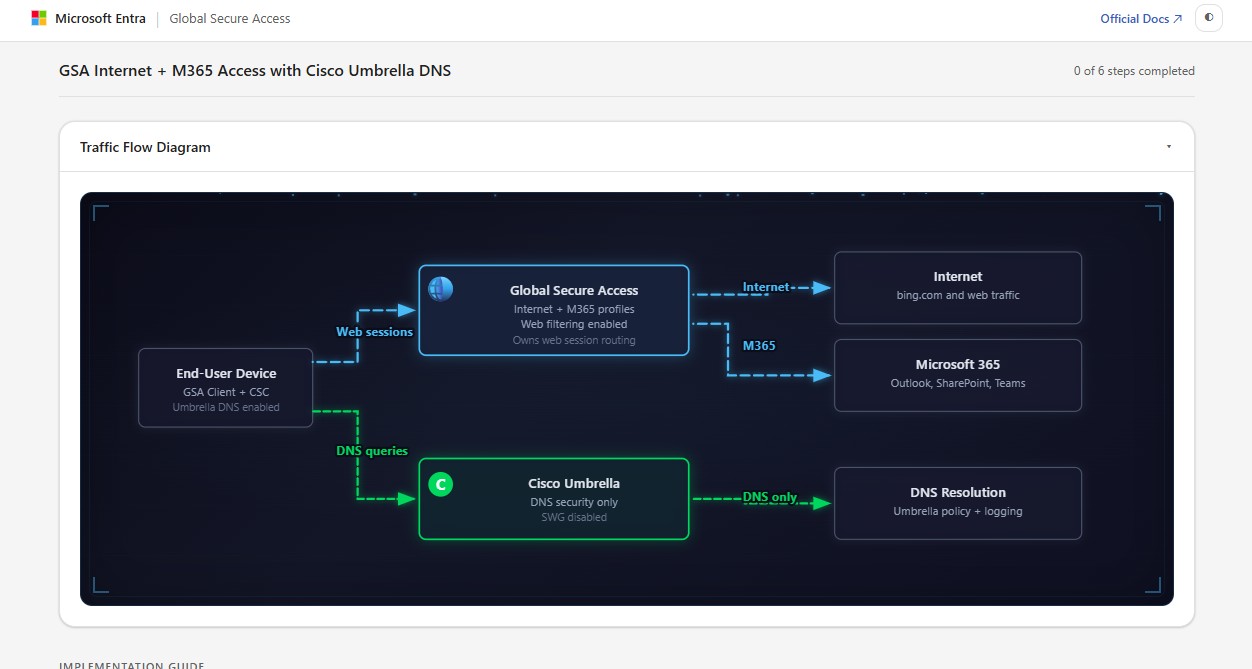
    <div class="sxs-slide" style="flex:0 0 100%;overflow:hidden;"><div style="height:460px;overflow:hidden;background:var(--bg-subtle,#f6f8fa);display:flex;align-items:center;justify-content:center;"><img src="/images/gsa-side-by-side/Image2.jpg" alt="Global Secure Access and Cisco Umbrella coexistence scenario selection with traffic ownership breakdown" style="width:100%;height:100%;object-fit:contain;display:block;border-radius:0;" loading="lazy"/></div><div style="text-align:center;padding:.5rem .75rem .65rem;font-size:.8rem;color:var(--text-muted,#64748b);border-top:1px solid var(--border,#e2e8f0);">Scenario picker — select your deployment pattern and see traffic ownership</div></div>
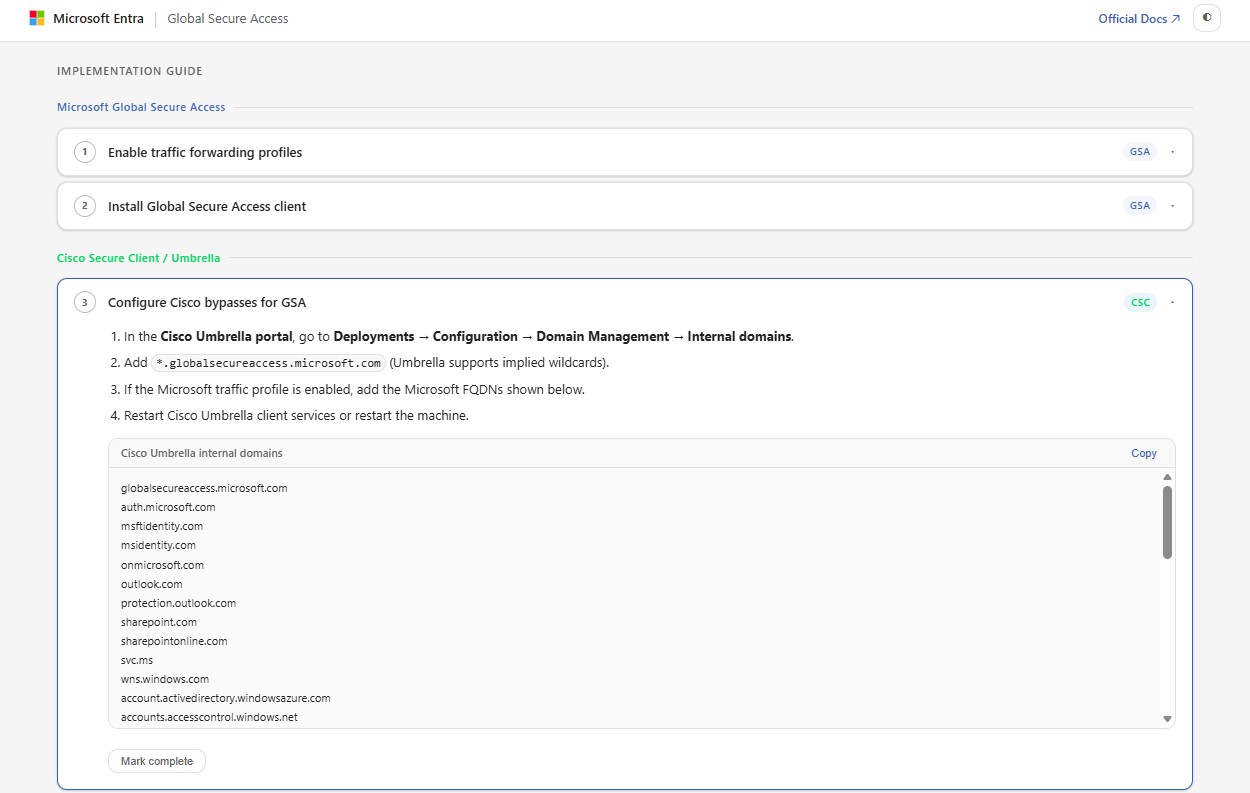
    <div class="sxs-slide" style="flex:0 0 100%;overflow:hidden;"><div style="height:460px;overflow:hidden;background:var(--bg-subtle,#f6f8fa);display:flex;align-items:center;justify-content:center;"><img src="/images/gsa-side-by-side/image3.jpg" alt="Animated traffic flow diagram showing GSA and Cisco Umbrella split-tunnel routing with DNS security" style="width:100%;height:100%;object-fit:contain;display:block;border-radius:0;" loading="lazy"/></div><div style="text-align:center;padding:.5rem .75rem .65rem;font-size:.8rem;color:var(--text-muted,#64748b);border-top:1px solid var(--border,#e2e8f0);">Animated traffic flow — see exactly how GSA and Cisco split routing</div></div>
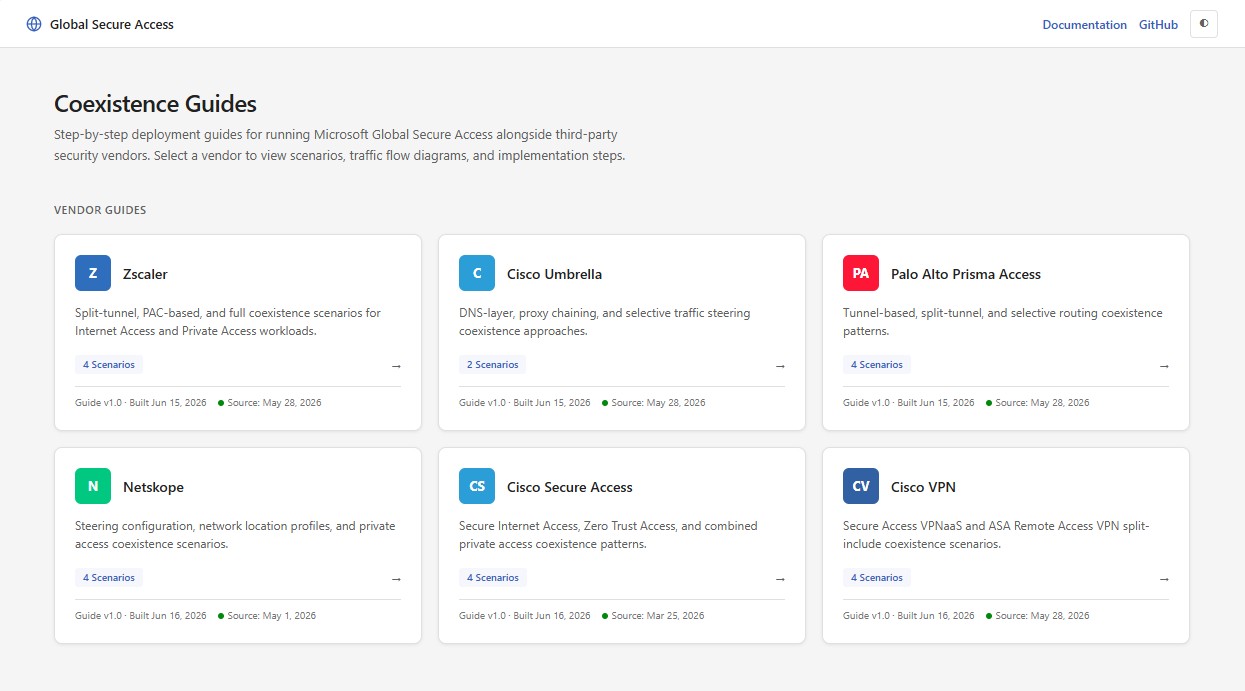
    <div class="sxs-slide" style="flex:0 0 100%;overflow:hidden;"><div style="height:460px;overflow:hidden;background:var(--bg-subtle,#f6f8fa);display:flex;align-items:center;justify-content:center;"><img src="/images/gsa-side-by-side/image4.jpg" alt="Step-by-step GSA coexistence implementation with expandable instructions and copy-to-clipboard config blocks" style="width:100%;height:100%;object-fit:contain;display:block;border-radius:0;" loading="lazy"/></div><div style="text-align:center;padding:.5rem .75rem .65rem;font-size:.8rem;color:var(--text-muted,#64748b);border-top:1px solid var(--border,#e2e8f0);">Implementation steps — expandable instructions with copy-to-clipboard config</div></div>
  </div>
  <button onclick="sxsCarousel(-1)" aria-label="Previous slide" style="position:absolute;top:230px;left:.5rem;background:rgba(0,0,0,.45);color:#fff;border:none;border-radius:50%;width:2.2rem;height:2.2rem;font-size:1.1rem;cursor:pointer;line-height:1;z-index:2;">&#8249;</button>
  <button onclick="sxsCarousel(1)" aria-label="Next slide" style="position:absolute;top:230px;right:.5rem;background:rgba(0,0,0,.45);color:#fff;border:none;border-radius:50%;width:2.2rem;height:2.2rem;font-size:1.1rem;cursor:pointer;line-height:1;z-index:2;">&#8250;</button>
  <div style="position:absolute;bottom:.6rem;left:50%;transform:translateX(-50%);display:flex;gap:.4rem;" id="sxs-dots"></div>
</div>
<script>
(function(){
  var idx=0,total=4;
  var el=document.getElementById('sxs-carousel');
  var track=document.getElementById('sxs-track');
  var dotsEl=document.getElementById('sxs-dots');
  var dots=[];
  for(var i=0;i<total;i++){
    var d=document.createElement('button');
    d.style.cssText='width:.55rem;height:.55rem;border-radius:50%;border:none;background:rgba(255,255,255,.5);cursor:pointer;padding:0;';
    d.setAttribute('aria-label','Go to slide '+(i+1));
    (function(n){d.onclick=function(){go(n);};})(i);
    dotsEl.appendChild(d);dots.push(d);
  }
  function go(n){
    idx=((n%total)+total)%total;
    var slides=track.children;
    var offset=0;
    for(var i=0;i<idx;i++) offset+=slides[i].offsetWidth;
    track.style.transform='translateX(-'+offset+'px)';
    dots.forEach(function(d,i){d.style.background=i===idx?'#fff':'rgba(255,255,255,.5)';});
  }
  go(0);
  window.addEventListener('resize',function(){go(idx);});
  window.sxsCarousel=function(dir){go(idx+dir);};
})();
</script>

### Coexistence scenario selection

Every guide starts with a scenario picker. Instead of reading through all possible configurations to find the one that fits, you select your coexistence deployment pattern up front and everything downstream — diagrams, steps, config blocks — adapts to that specific scenario. The Zscaler guide, for example, offers four distinct patterns:

1. **Split-tunnel** — GSA handles Microsoft 365 and Private Access traffic, Zscaler handles internet
2. **PAC-based** — Browser traffic steered via PAC file, non-browser via GSA
3. **Full coexistence** — Both products active for all traffic with priority rules
4. **Selective routing** — Granular per-app or per-FQDN steering

### Animated traffic flow diagrams

Each scenario includes an animated SVG diagram showing exactly how traffic routes through the network stack — which traffic hits the Global Secure Access client first, which bypasses to the vendor, where DNS resolves, and how Private Access tunnels coexist with vendor VPN tunnels. The animations trace the packet path step by step, making it significantly easier to understand the routing logic than reading a prose description.

### Step-by-step coexistence implementation

Each scenario breaks down into numbered, expandable steps. Click a step to expand the full instructions with the specific admin console or CLI to open, copy-to-clipboard config blocks ready to paste, and context on why each step matters and what depends on it. Steps are grouped by product — Global Secure Access configuration, vendor-side configuration, and verification — so you always know which console to work in.

### Tenant ID integration for bypass FQDNs

Enter your Entra tenant GUID once at the top, and every config block throughout the guide automatically populates tenant-specific values — bypass FQDNs for `*.globalsecureaccess.microsoft.com`, Microsoft 365 service endpoints, and conditional access parameters. No more manual find-and-replace across dozens of domain entries.

### Deployment progress tracking

Checkboxes on each step let you track completion as you work through the deployment. This is particularly useful in change-window scenarios where you're implementing steps across the Microsoft Entra admin center and a vendor portal and need to keep your place.

## Supported SASE and VPN vendors for GSA coexistence

| Vendor | Scenarios | Key patterns |
| --- | --- | --- |
| **Zscaler** | 4 | Split-tunnel, PAC-based, full coexistence, selective routing |
| **Cisco Umbrella** | 2 | DNS-layer, proxy chaining |
| **Cisco Secure Access** | 4 | Secure Internet Access, Zero Trust Access, combined private access |
| **Cisco VPN** | 4 | Secure Access VPNaaS, ASA Remote Access VPN split-include |
| **Palo Alto Prisma Access** | 4 | Tunnel-based, split-tunnel, selective routing |
| **Netskope** | 4 | Steering configuration, network location profiles, private access |

Each guide is built from the corresponding [Microsoft Learn coexistence documentation](https://learn.microsoft.com/en-us/entra/global-secure-access/) and tracks the source document version so you know when the guide was last aligned with the official docs.

## GSA SxS Checker: diagnostic companion for coexistence

If you've read the [GSA SxS Checker post](/blog/gsa-sxs-checker/), you might be wondering how these two tools relate. They're complementary:

1. **GSA SxS Checker** answers: *"Is there a conflict on this machine?"* — It scans the device for WFP driver conflicts and produces a diagnostic report.
2. **GSA Side-by-Side Guides** answer: *"How do I configure both products to work together?"* — Once you know a conflict exists (or before you deploy), these guides walk you through the configuration.

The typical workflow is: run the Checker to identify what's installed → use the corresponding Side-by-Side guide to configure coexistence → re-run the Checker to verify the conflict is resolved or acknowledged.

## Frequently asked questions

**Can I run Global Secure Access and Zscaler on the same device?**
Yes. GSA supports split-tunnel, PAC-based, and full coexistence modes with Zscaler. The guides walk through each pattern with traffic flow diagrams and step-by-step configuration for both the Microsoft Entra admin center and the Zscaler portal.

**Does GSA work alongside Cisco Umbrella or Cisco Secure Access?**
Yes. Separate guides cover Cisco Umbrella (DNS-layer and proxy chaining), Cisco Secure Access (Secure Internet Access, Zero Trust Access, combined private access), and Cisco VPN (AnyConnect, ASA Remote Access). Each guide shows the exact bypass FQDNs and WFP driver ordering required.

**How do I configure Global Secure Access coexistence with Palo Alto Prisma Access or Netskope?**
Both vendors are supported with four coexistence scenarios each. The Palo Alto guide covers tunnel-based, split-tunnel, and selective routing patterns. The Netskope guide covers steering configuration, network location profiles, and private access coexistence.

**Do the guides require a server or backend?**
No. Every guide is a self-contained HTML page hosted on GitHub Pages. No login, no API calls, no server-side dependencies. Your tenant ID stays in the browser — nothing is transmitted.

## Microsoft Learn coexistence reference documentation

- [Coexistence with Zscaler](https://learn.microsoft.com/en-us/entra/global-secure-access/how-to-zscaler-coexistence)
- [Coexistence with Cisco Umbrella](https://learn.microsoft.com/en-us/entra/global-secure-access/how-to-cisco-coexistence?tabs=cisco-umbrella-portal)
- [Coexistence with Cisco Secure Access](https://learn.microsoft.com/en-us/entra/global-secure-access/how-to-cisco-secure-access-coexistence)
- [Coexistence with Cisco VPN](https://learn.microsoft.com/en-us/entra/global-secure-access/how-to-cisco-vpn-coexistence)
- [Coexistence with Palo Alto Networks](https://learn.microsoft.com/en-us/entra/global-secure-access/how-to-palo-alto-coexistence)
- [Coexistence with Netskope](https://learn.microsoft.com/en-us/entra/global-secure-access/how-to-netskope-coexistence)

---

**Source:** [github.com/jeevanbisht/GSASidebySide](https://github.com/jeevanbisht/GSASidebySide) — MIT licensed, static HTML, no dependencies.