SPIFFE & SPIRE Hands-On Labs: Learn Workload Identity From Scratch
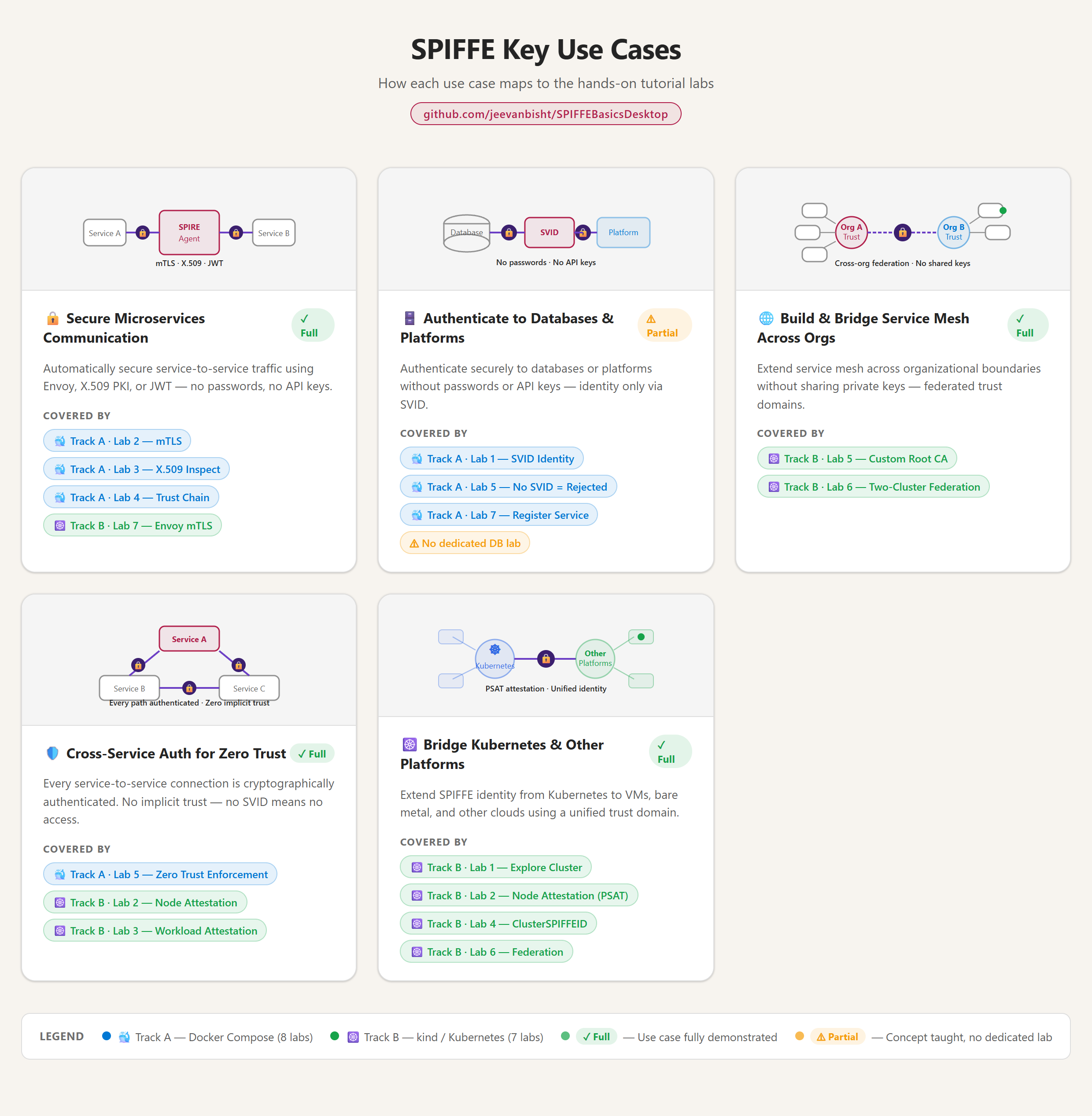
New to workload identity? This is a free, self-paced SPIFFE & SPIRE hands-on lab for beginners — a step-by-step tutorial you can run entirely on your laptop. Across 15 labs you’ll go from the core concepts to getting started with mTLS and zero trust, with no cloud account, no sign-ups, and no cost.
The problem SPIFFE/SPIRE solves
In modern distributed systems, the traditional approach to service-to-service trust is broken:
- Long-lived API keys stored in environment variables
- Shared database passwords in config files
- IP-based allowlists (“trust everything from 10.0.0.x”)
- Certificates that never rotate
The SPIFFE/SPIRE approach replaces all of that:
- Every workload gets a cryptographic identity (an SVID)
- Short-lived, auto-rotating certificates (default: 1 hour)
- Identity based on workload attributes — not IP or hostname
- Mutual TLS between all services, with zero shared secrets
How do two services prove who they are to each other without shared passwords, long-lived API keys, or brittle IP allowlists? That’s the problem SPIFFE and SPIRE solve — and SPIFFEBasicsDesktop is a standalone tutorial I built to teach it from scratch, running entirely on a single laptop.
This quickly becomes relevant in the new world of agents too, where we think about providing each agent an identity or AgentID which might work across multiple cloud providers.
Key concepts at a glance
| Term | Meaning |
|---|---|
| SPIFFE | The standard — defines what a workload identity looks like |
| SPIFFE ID | A URI like spiffe://example.org/service/frontend |
| SVID | The X.509 cert or JWT that carries the SPIFFE ID |
| SPIRE | The implementation — issues and manages SVIDs |
| Trust Domain | A security boundary, like a DNS domain for identities |
| Node Attestation | How an agent proves which node it’s running on |
| Workload Attestation | How an agent proves which process is requesting an SVID |
Architecture overview
SPIRE has two moving parts. The SPIRE Server is the brain — it holds the CA/PKI, the registration registry, and the policies. The SPIRE Agent runs on each node, attests to the server over mTLS, and hands out SVIDs to local workloads through a Unix-socket Workload API. Your app never touches a key directly — it just asks the Workload API and gets a freshly rotated identity.
+----------------------------------------------------------------+
|                      SPIRE Architecture                        |
|                                                                |
|  +--------------+          +-----------------------------+     |
|  | SPIRE Server |          |           Node              |     |
|  |              |<-------->|  +-------------+            |     |
|  |  - CA / PKI  |   mTLS   |  | SPIRE Agent |            |     |
|  |  - Registry  |          |  |             |<-----+     |     |
|  |  - Policies  |          |  | - Attests   |      |     |     |
|  +--------------+          |  | - Issues    |  Workload  |     |
|                            |  |   SVIDs     |  API (Unix |     |
|                            |  +-------------+  socket)   |     |
|                            |        ^           |        |     |
|                            |        |    +------v------+ |     |
|                            |        |    |  Workload   | |     |
|                            |        |    |  (your app) | |     |
|                            |        |    |             | |     |
|                            |        |    |  Gets SVID  | |     |
|                            |        +----+-------------+ |     |
|                            +-----------------------------+     |
+----------------------------------------------------------------+
New to the topic? This community talk is a great primer before you dive into the labs:
Why I built it
These concepts don’t have an easy on-ramp. Workload identity, attestation, trust domains, SVIDs — they’re genuinely complex to even try out, let alone reason about. Most SPIFFE/SPIRE tutorials assume a cloud account and a running Kubernetes cluster before you’ve even grasped what an SVID is.
The way I learn is by simplifying things and actually trying them out. So I built this tutorial for myself and my team — to create a place to learn the concepts hands-on, on your own machine, with nothing but Docker Desktop. No cloud, no sign-ups, no cost — just 15 labs that build understanding step by step.
There’s a bigger reason too. I wanted to build the foundation for how agents might have an identity — one that works across workloads, machines, datacenters, and clouds. Once you understand the foundations, it all starts to make sense.
The hands-on labs: two tracks, 15 labs
The tutorial is split into two tracks so you can go as deep as you like:
- 🐳 Track A — Docker Compose (8 labs): SPIFFE concepts, mTLS, and SVID inspection using only Docker Desktop.
- ☸️ Track B — kind/Kubernetes (7 labs): Kubernetes node and workload attestation, SPIFFE federation, and transparent mTLS with Envoy.
The only hard requirement is Docker Desktop; Track B adds kind and kubectl.
What you’ll learn in these labs
By the end you’ll have watched an SVID get issued, seen automatic certificate rotation, proven that no SVID means no access (zero trust in practice), dug into node and workload attestation on Kubernetes, and even stood up two-cluster SPIFFE federation with Envoy doing transparent mTLS.
Getting started: 60-second quickstart
git clone https://github.com/jeevanbisht/SPIFFEBasicsDesktop.git
cd SPIFFEBasicsDesktop/docker-compose
docker compose up -d --build
# Wait ~60 seconds, then:
curl http://localhost:3000/demo
# ← Served over mTLS using SPIFFE SVIDs, zero passwords!
There are also Makefile shortcuts (make up, make demo, make inspect-cert, make kind-up) to keep the common flows one command away.
Try it
Clone the repo and start with Track A — you’ll have mTLS-secured services talking to each other in few minutes: github.com/jeevanbisht/SPIFFEBasicsDesktop.
← Back to all posts